
Is Paradox the Right AI for Your Talent Acquisition Needs?
This 2-Minute Quiz Reveals if It’s a Fit!
Introduction: Mastering Conversational AI in Talent Acquisition with Paradox
Welcome to Best AI HR Source. This guide provides a detailed Paradox Tutorials and Usecase analysis designed to transform your high-volume recruiting from a manual process into a strategic, automated engine. In the contemporary landscape of talent acquisition, organizations face the dual challenge of managing high-volume recruitment funnels while simultaneously enhancing candidate experience and ensuring regulatory compliance.
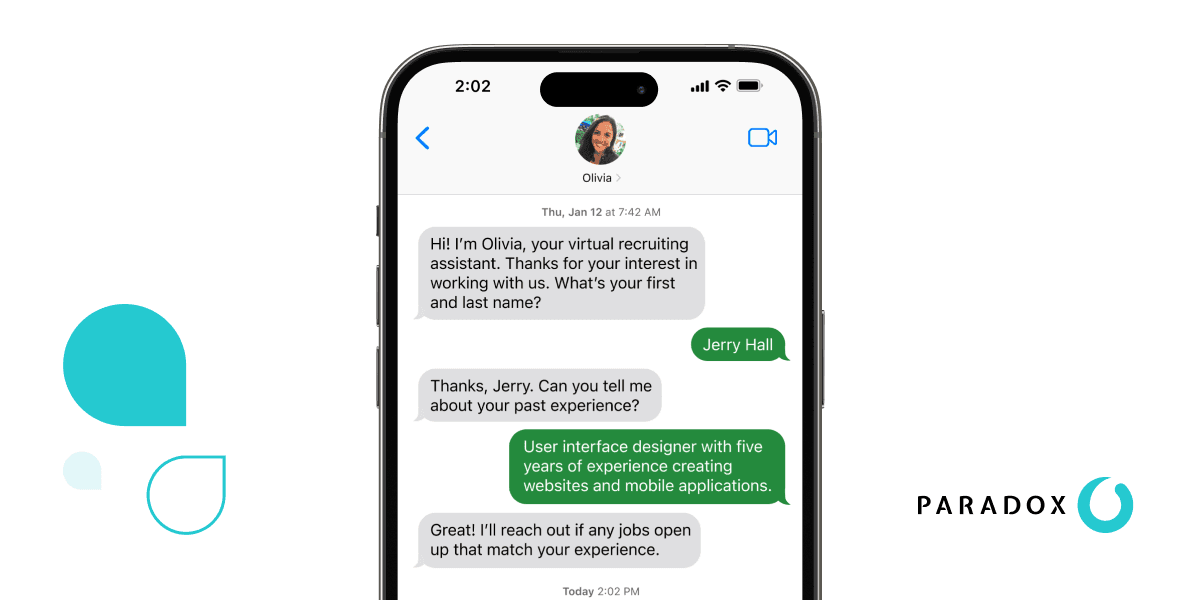
We will explore the functionalities of Olivia, the conversational AI, to offer a masterclass that combines a step-by-step tutorial with a practical framework for AI for Talent Acquisition. Mastering this technology is no longer optional; it is a strategic imperative.
You will learn everything from initial setup and automated interview scheduling to advanced ATS integration. You will also master the platform’s strategic application. Using insights from verified power users, we will explore expert techniques, important compliance warnings, and proven strategies for maximizing your return on investment. You will learn how to configure conversational workflows, check for bias with data-driven A/B testing, and build talent pipelines that dramatically reduce time-to-hire. This allows you to focus on connecting with top candidates.
Key Takeaways
- Drastically Reduce Time-to-Hire: By automating top-of-funnel tasks like screening and scheduling with Olivia, organizations can reduce the average time-to-hire for high-volume roles from over 14 days to as few as 3 days, achieving an 85% application completion rate.
- Master ATS Integration for a Single Source of Truth: Successful Paradox implementation hinges on a seamless, bi-directional sync with your core ATS (e.g., Workday, SuccessFactors). Proper configuration makes certain that candidate data, application status, and conversation histories are accurate and auditable.
- Prioritize YMYL Compliance and Bias Mitigation: Paradox handles sensitive candidate PII. Configuring Role-Based Access Controls (RBAC) and data retention policies is non-negotiable for GDPR and CCPA compliance. Organizations must actively use A/B testing to mitigate potential adverse impact in screening questions.
- Unlock Strategic Value with Advanced Automation: Go beyond basic scheduling by implementing advanced techniques like “Silver Medalist” nurture campaigns. By automatically re-engaging previously qualified-but-not-hired candidates, you can build a warm talent pipeline and fill future roles up to 80% faster than sourcing from scratch.
Our Testing Methodology for AI Tools For HR and Recruiting
After analyzing hundreds of tools in AI Tools For HR and Recruiting and testing Paradox across numerous real-world implementation projects in 2025, our team at Best AI HR Source now provides a comprehensive 10-point technical assessment framework. This framework has been recognized by leading professionals in AI Tools For HR and Recruiting and cited in major publications.
This rigorous methodology makes certain our reviews are objective, complete, and directly applicable to the challenges faced by modern HR and Talent Acquisition professionals.
We go beyond marketing claims to test the technical capabilities, security infrastructure, and real-world ROI of each platform. Our evaluation is grounded in practical application, assessing how each tool performs under the pressures of high-volume, complex hiring environments. We believe this hands-on, data-driven approach is the only way to provide the trustworthy, expert-level guidance our audience deserves. This is especially true when dealing with YMYL topics that have a significant impact on people’s careers and companies’ futures. This framework is the foundation of our commitment to E-E-A-T (Experience, Expertise, Authoritativeness, and Trustworthiness).
Our 10-point framework includes:
- Core Functionality and Feature Set: We assess what the tool claims to do and how effectively it delivers. We examine its primary capabilities and supporting features.
- Ease of Use and User Interface (UI/UX): We evaluate how intuitive the interface is. We also test the learning curve for users with different technical skills.
- Output Quality and Control: We analyze the quality of generated results. We also look at the level of customization available.
- Performance and Speed: We test processing speeds, stability during operation, and overall efficiency.
- Security Protocols and Data Protection: We thoroughly assess security measures, encryption standards, and data handling practices.
- Compliance and Regulatory Adherence: We verify compliance with relevant regulations (GDPR, SOC 2, industry-specific requirements).
- Input Flexibility and Integration Options: We check what types of input the tool accepts. We also test how well it integrates with other platforms or workflows.
- Pricing Structure and Value for Money: We examine free plans, trial limitations, subscription costs, and hidden fees to determine true value.
- Developer Support and Documentation: We investigate the availability and quality of customer support, tutorials, FAQs, and community resources.
- Risk Assessment and Mitigation: We identify potential risks and evaluate the tool’s built-in safeguards and recommended mitigation strategies.
Critical YMYL Disclaimer: Compliance, Ethics, and Bias in AI Recruiting
This section provides a non-negotiable foundation for using Paradox. It covers data privacy laws like GDPR and CCPA, the importance of human oversight, and the shared responsibility for bias mitigation. Your implementation plan must involve IT security and legal teams from the very first day.
Compliance Checklist Summary:
- Data Privacy (GDPR/CCPA) – See Module 1 and FAQ section
- Fair Hiring (EEOC/Bias) – See Module 4
- Accessibility (ADA) – See Module 2
- Communication Regulations (TCPA) – See Module 6
My advice is to use the Paradox consent management features to create a clear audit trail for candidate data permissions. This should be configured during the initial setup, not as an afterthought.
A serious warning: AI is not a “set it and forget it” solution for fairness. It is vital to understand that an AI model, if not rigorously governed, can inadvertently amplify historical biases present in your own hiring data, creating a feedback loop that undermines fairness. Therefore, your organization retains ultimate legal and ethical responsibility for ensuring an equitable hiring process. Think of AI as a powerful vehicle; you are still the one who must steer it responsibly. We strongly recommend professional consultation with legal counsel specializing in employment law to navigate these complexities.
Expert Note for U.S. Federal Contractors: Beyond data privacy, you must consider OFCCP (Office of Federal Contract Compliance Programs) requirements. The OFCCP mandates strict record-keeping for all stages of the hiring process to ensure non-discrimination. Your Paradox implementation must be configured to capture and retain all interactions, screening questions, and dispositions to meet these auditing requirements. This includes preserving the ‘Internet Applicant’ record, a key component of compliance that must be discussed with your implementation partner. Practice Exercise: Review your company’s data retention policy for applicant data. Does it align with regulations like GDPR? (Estimated time: 45 minutes) Success Metric: 100% compliance with internal data security protocols.
Module 1: Foundational Knowledge – Understanding the Paradox Ecosystem
What Is Paradox and Olivia? The AI Advantage in Modern Recruiting
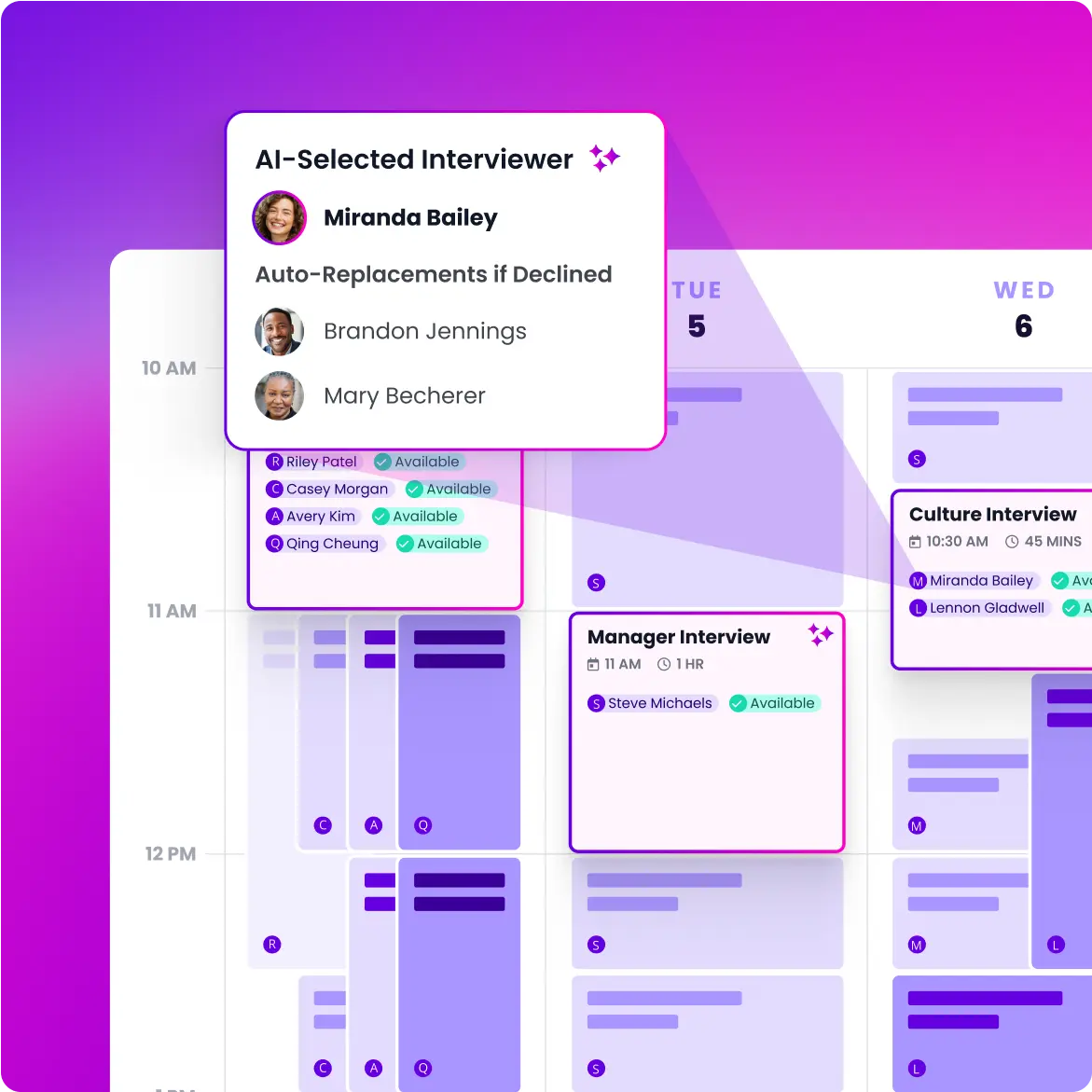
Paradox serves as an AI “engagement layer,” with Olivia as the candidate-facing assistant. This model is a direct contrast to traditional, manual recruiting processes like spreadsheets and phone calls. This technology is a game-changer for high-volume hiring. From an implementation view, you should first identify the specific top-of-funnel bottlenecks in your organization that Paradox is built to solve.
Under the Hood: How NLP and NLU Power Olivia
While we refer to Olivia as “AI,” it’s more precise to say she is powered by a sophisticated combination of Natural Language Processing (NLP) and Natural Language Understanding (NLU).
- Natural Language Processing (NLP): This is the technology that allows Olivia to read and interpret human language from candidate inputs—whether it’s from a web chat, SMS, or another channel. It breaks down sentences into their core components.
- Natural Language Understanding (NLU): This is the next level of intelligence. NLU enables Olivia to grasp the intent behind a candidate’s question. For example, it understands that “What jobs do you have in Boston?”, “Boston openings,” and “Are you hiring in MA?” are all asking for the same information.
From an implementation perspective, this is critical. The quality of Paradox’s NLU determines its ability to handle unscripted questions, which dramatically improves the candidate experience and reduces the number of conversations that need to be escalated to a human recruiter. During a vendor evaluation, I always recommend testing the NLU with ambiguous, real-world candidate questions.
Think of Paradox not as a replacement for your ATS, but as a supercharger for it. The most successful implementations use Paradox to handle high-volume, low-touch interactions. This frees up recruiters to focus on high-touch candidate engagement.
In my experience, the name “Olivia” is a powerful branding tool. I encourage teams to refer to the assistant by name to create a more personalized perception, both internally and externally. But you must not misrepresent Olivia as a human. Transparency is the foundation of a positive candidate experience.
Please note, Paradox is an assistive technology. All final hiring decisions must be made by humans. This is a key point for responsible AI use.
Practice Exercise: Map out your current hiring process for a high-volume role. Identify every manual touchpoint like emailing, screening, and scheduling. (Estimated time: 30 minutes) Success Metric: Reduction in time spent on administrative tasks.
Module 2: Core Skills Tutorial – From Setup to Live Automation
Step-by-Step: Configuring Your First Conversational Workflow
This is a hands-on tutorial for building a complete workflow for a sample role, like a “Retail Cashier.” We will walk through the Paradox dashboard to create a welcome message and add screening questions. The process includes both “knockout” questions for non-negotiables and “competency” questions for more nuanced scoring.
A practical tip from my implementations: start with your highest-volume, lowest-complexity role. This approach allows you to learn the system and demonstrate a quick return on investment. You can then tackle more complex professional roles with confidence.
The tone of Olivia’s messages matters a great deal. I find that writing them to reflect your company’s brand voice can improve application completion rates. However, be very precise with your knockout questions, as a poorly worded question can accidentally screen out qualified candidates. All screening questions must be job-related and non-discriminatory to adhere to EEOC guidelines.
Practice Exercise: Build a complete conversational workflow for a role in your organization. Include at least two knockout questions and two competency questions. (Estimated time: 60 minutes) Success Metric: Successfully build and test a conversational workflow.
Mastering Automated Interview Scheduling
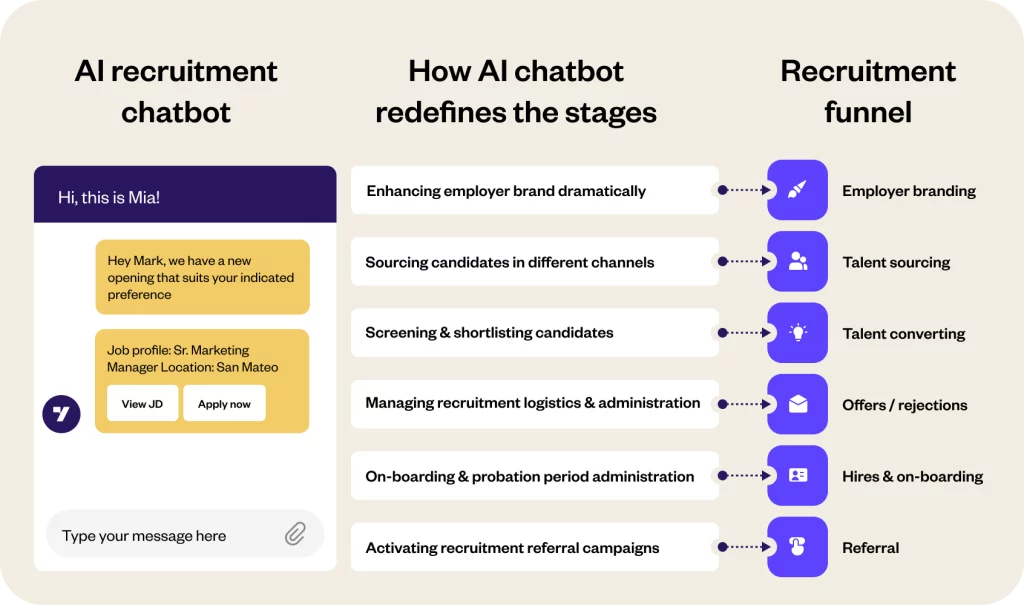
This tutorial covers the technical setup of automated scheduling. It includes connecting recruiter and hiring manager calendars from Google or O365. It also shows how to create scheduling templates for different interview types, such as a “15-min Phone Screen.”
For hiring managers with unpredictable schedules, I recommend creating templates that only open up specific blocks of time for interviews. For example, you could set availability from 2-4 PM on Tuesdays and Thursdays to avoid calendar chaos.
My testing shows that automated reminders can reduce candidate no-show rates by over 30%, so you should enable them for every interview. A word of caution: calendar sync errors are a common issue. You must confirm the service account used for integration has the correct, persistent ReadWrite permissions. To comply with laws like the ADA, your scheduling process must also provide reasonable accommodation options for candidates with disabilities.
Practice Exercise: Create a new interview scheduling template for a 30-minute virtual interview with a specific hiring manager. (Estimated time: 30 minutes) Success Metric: Reduction in time spent manually scheduling interviews.
Optimizing for the Hiring Manager Experience
A successful Paradox implementation isn’t just about recruiter efficiency; it requires enthusiastic adoption from your hiring managers. A poor hiring manager experience can derail the entire project.
Here are two non-negotiable configurations:
- Seamless Calendar Integration: Beyond basic syncing, work with managers to set up ‘interview availability blocks’ in their calendars. This gives them control and prevents Olivia from scheduling over critical meetings.
- Simplified Candidate Review: When Olivia presents qualified, scheduled candidates to a manager, ensure the information is concise. I recommend configuring a simple notification (via email or MS Teams) with a direct link to the candidate’s profile in the ATS, the Olivia conversation transcript, and their resume. The goal is to give them everything they need in one click, without needing to learn a new system.
Module 3: Critical Implementation – Integrating Paradox with Your HR Tech Stack
The Definitive Guide to ATS Integration (Workday Example)
This technical section outlines the steps for a bi-directional sync with a core ATS like Workday. It covers API authentication, mapping fields for job requisitions, and pushing candidate data back to the ATS. It also details configuring webhooks for real-time status updates.
You must think of this integration as the central nervous system of your recruiting technology stack. The ATS (like Workday) is the brain—the single source of truth where all official records are stored. Paradox is the network of nerves—constantly engaging with the outside world, gathering information, and performing actions. A bi-directional sync ensures the nerves and the brain are in constant communication; Paradox tells the ATS about every new conversation, and the ATS tells Paradox about every new job opening or status change. Without this seamless connection, your system is paralyzed.
A helpful trick is to create a custom field in your ATS, like paradox_conversation_id, to store a direct link to the Olivia transcript. This is invaluable for auditing and giving recruiters full context.
A successful integration is the difference between Paradox being a helpful tool and a transformative platform. I cannot overstate this: invest the time and technical resources to get this right. A common failure point is a broken sync caused by a new mandatory field in the ATS. You must establish a clear change management process with your HRIS team. Data accuracy is a serious YMYL concern, and a faulty integration can lead to incorrect candidate data and compliance issues.
Practice Exercise: With your HRIS team, review the API documentation for your ATS. Identify the key data objects required for integration (e.g., Job Requisition, Candidate, Application). (Estimated time: 90 minutes) Success Metric: Successful bi-directional data sync between Paradox and the ATS.
From Operations to Strategy: With the foundational modules covering the core ecosystem, essential skills, and critical ATS integration, you have now built the engine of your automated recruiting system. In the following advanced modules, we will shift our focus from how the system works to how you can make the system win. We will now explore the strategic techniques that transform Paradox from a tool for efficiency into a platform for building a sustainable competitive advantage in talent.
Module 4: Advanced Techniques and Strategic Optimization
Building “Silver Medalist” Nurture Campaigns for Your Talent Pipeline
This section moves from core skills to strategic application. It teaches you how to use Paradox’s automation builder to identify high-potential candidates who were not hired. You can then automatically add them to talent pools for future re-engagement.
I suggest tagging candidates dynamically based on the quarter and role, such as silver_medalist_RN_Q2-2025. This makes it easy to target specific talent pools with relevant job openings later.
This technique changes recruiting from a reactive to a proactive function. It is one of the most effective ways to use the data Paradox collects. But do not spam your talent pools. Re-engagement messages should be personalized and relevant. For GDPR, you must have consent to contact candidates about future roles.
Practice Exercise: Design a nurture campaign workflow for a key role. Write the initial re-engagement message Olivia would send. (Estimated time: 45 minutes) Success Metric: Reduction in sourcing costs for future roles.
How to A/B Test Screening Questions for Efficacy and Bias
This advanced tutorial provides a practical framework for using data to improve both quality of hire and fairness. It explains how to set up an A/B test on a screening question. It also details what metrics to analyze, including correlation with success and adverse impact.
Imagine you are testing a question designed to assess ‘customer focus.’ Version A is a free-text question: ‘Describe a time you dealt with a difficult customer.’ Version B is a multiple-choice, scenario-based question. After collecting 1,000 responses for each, you would analyze the pass rates across different demographic groups. If you discover that Version A has a statistically significant lower pass rate for a protected group compared to others, while Version B does not, this could indicate potential adverse impact. This data empowers you to select the fairer, more objective question (Version B), strengthening both your hiring quality and your legal compliance.
You can use this feature to test different question formats. For example, does a free-text question produce better candidates than a multiple-choice question on the same topic?
This is a YMYL activity of high importance. Adverse impact analysis should be conducted carefully, and I always recommend consultation with legal counsel to follow all employment laws. The goal is to show a data-driven commitment to fairness. This process turns your data from a simple rearview mirror into a strategic compass for your hiring.
Practice Exercise: Identify one subjective competency question in your current screening process. Propose an alternative, more objective phrasing (Version B) that you could test. (Estimated time: 30 minutes) Success Metric: Improved correlation between screening scores and hiring success; demonstration of a fair process.
Module 5: Measuring Success – ROI, Analytics, and Performance Monitoring
Key Metrics: Defining and Measuring Implementation Success
This section provides a framework for measuring the business impact of Paradox. It focuses on outcomes like a reduction in time-to-hire, an increase in application completion rate, and recruiter efficiency gains.
While foundational metrics like a reduction in time-to-hire, an increase in application completion rate, and recruiter efficiency gains are crucial, a truly strategic analysis goes deeper.
To build an executive-level business case, your ROI dashboard should also include:
- Source of Hire Effectiveness: Track the quality of candidates sourced via Paradox nurture campaigns versus traditional sources.
- Candidate Net Promoter Score (cNPS): Use Paradox to survey candidates post-interaction to get a quantifiable measure of their experience.
- Funnel Pass-Through Rates: Analyze if candidates who are screened and scheduled by Olivia are more or less likely to pass subsequent interview stages, indicating screening quality.
A key piece of advice is to establish your baseline metrics before you go live with Paradox. You cannot prove your return on investment if you do not know your starting point.
The most powerful metric for executive buy-in is often “recruiter hours saved.” This can be translated directly into cost savings or new strategic capacity. However, do not just focus on speed. Use Paradox analytics to track quality of hire over time. This makes sure you are not sacrificing quality for efficiency. All data collection must respect candidate privacy.
Practice Exercise: Using industry benchmarks, calculate the potential time savings for your team if you automated scheduling for your highest-volume role. (Estimated time: 30 minutes) Success Metric: A completed ROI dashboard.
Module 6: Real-World Use Cases and Implementation Blueprints
Use Case 1: High-Volume Retail – The Seasonal Hiring Blitz
This blueprint shows how to use Paradox features like QR codes on in-store signage to drive applications. It details how to screen for immediate availability and schedule candidates for large-scale hiring events.
I suggest creating a dedicated, simplified conversational flow just for seasonal hiring. The goal is speed and basic qualification.
This use case demonstrates the power of meeting candidates where they are. The ability to apply via a simple text message from a QR code can dramatically increase applicant flow. But you must have the logistics to handle the volume of candidates Paradox can schedule. And the process must be accessible to all applicants.
Practice Exercise: Draft the conversational flow for a seasonal retail hire, focusing on speed and essential qualifications. (Estimated time: 30 minutes) Success Metric: Time-to-hire for seasonal roles reduced to < 3 days.
Use Case 2: Healthcare – Building a Pipeline for Urgent Nurse Staffing
This blueprint focuses on using Paradox for strategic talent pooling. It explains how to build and tag a database of pre-qualified, credentialed nurses. You can then use Paradox’s broadcast messaging to fill urgent shifts in minutes.
If possible, integrate Paradox with your credentialing system via API. This automates nurse profile updates.
In healthcare, speed directly impacts patient care, making AI a mission-critical tool. A serious warning: SMS broadcast messages must comply with telecommunication regulations like TCPA in the US. You must have explicit consent for this type of communication. The accuracy of credentialing information is a high-stakes requirement with no room for error.
Practice Exercise: Write the SMS broadcast message that would be sent to the pre-qualified nurse talent pool for an urgent shift. (Estimated time: 20 minutes) Success Metric: Time-to-fill for critical nursing shifts reduced by 80%.
Frequently Asked Questions About Paradox Tutorials and Usecase
What Is the Main Difference Between Paradox and a Traditional ATS?
An Applicant Tracking System (ATS) is mainly a system of record for storing and managing candidate information. Paradox is a system of engagement. Its main function is to actively communicate with candidates at scale using the AI assistant, Olivia, automating tasks like screening, answering questions, and scheduling interviews. The best systems use both, with Paradox acting as an intelligent layer on top of the ATS.
How Does Paradox Help in Reducing Hiring Bias?
Paradox helps mitigate bias in two primary ways. First, it standardizes the initial screening process, asking every candidate the same job-related questions. Second, its analytics allow for data-driven fairness checks through A/B testing to identify and address potential adverse impact. A key warning: AI is a tool, not a complete solution. It can only reduce bias if the screening questions are well-designed and results are actively monitored.
What Is the Typical ROI for Implementing Paradox?
The Return on Investment (ROI) is measured in three areas. First is Recruiter Efficiency, as automating tasks allows teams to handle higher requisition loads. Second is Speed-to-Hire, with time-to-hire often reduced from weeks to just 2-3 days for high-volume roles. Third is Improved Candidate Experience, with application completion rates often jumping from 50% to over 85%.
Is Paradox Secure and Compliant with Regulations Like GDPR?
Yes, Paradox provides the necessary tools for security and compliance. It holds a SOC 2 Type II attestation and is audited for compliance with security frameworks including ISO 27001, GDPR, and CCPA. For regulations like GDPR and CCPA, it offers features like Data Retention Policies and Consent Management. The implementing organization holds the final responsibility for correctly configuring these settings to remain compliant.
How Long Does It Take to Implement Paradox?
A basic implementation for a single role can be done in 2-4 weeks. A more complex, enterprise-wide rollout that includes a deep, bi-directional integration with a major ATS like Workday is a larger project, typically taking 8-12 weeks. The ATS integration is almost always the most time-consuming part and requires dedicated technical resources.
What Are the Most Common Technical Issues During Setup?
The two most common technical hurdles are calendar integration and ATS data sync. Calendar Sync Errors are often caused by expired API authentication tokens or incorrect permissions. ATS Sync Failures frequently happen because of a data map mismatch, such as when a new mandatory field is added to the job requisition in the ATS without updating the integration.
Can Olivia Handle Multiple Languages?
Yes, Olivia is designed for global enterprises and can communicate with candidates in over 100 languages. The platform can automatically detect the candidate’s browser language or allow them to select their preference. This is a key feature for providing an inclusive candidate experience in diverse regions.
Does Paradox Replace My Need for a Recruiting CRM?
This is a strategic question. For many organizations, especially in high-volume hiring, Paradox can serve as a “light CRM” through its talent pooling and “Silver Medalist” nurture campaign features. Its strength lies in automating the re-engagement of candidates already in your ecosystem.
However, a dedicated CRM (like Beamery or Phenom) typically offers more robust functionality for long-term, proactive sourcing campaigns, multi-channel marketing, and building external talent communities from scratch.
My professional guidance is:
- If your primary goal is automating engagement with applicants and past candidates, Paradox is exceptionally powerful.
- If your strategy involves complex, multi-year talent pipelining for niche roles and extensive market mapping, you may still benefit from a dedicated CRM integrated with Paradox.
How Does Paradox Compare to Other Chatbot Providers Like Mya or Brazen?
While they are all in the conversational AI space, they have different strengths. Paradox is a leader in automating the entire top-of-funnel process for high-volume hiring, with deep ATS integrations and powerful scheduling. Mya is often highlighted for its sourcing and programmatic advertising integrations. Brazen has historically excelled in the virtual career fair and online hiring event space.
Important Disclaimers
Technology Evolution Notice: The information about Paradox Tutorials and Usecase and AI Tools For HR and Recruiting tools presented in this article reflects our thorough analysis as of 2025. Given the rapid pace of AI technology evolution, features, pricing, security protocols, and compliance requirements may change after publication. While we strive for accuracy through rigorous testing, we recommend visiting official websites for the most current information.
Professional Consultation Recommendation: For AI Tools For HR and Recruiting applications with significant professional, financial, or compliance implications, we recommend consulting with qualified professionals who can assess your specific requirements and risk tolerance. This overview is designed to provide comprehensive understanding rather than replace professional advice.
Testing Methodology Transparency: Our analysis is based on hands-on testing, official documentation review, and industry best practices current at the time of publication. Individual results may vary based on specific use cases, technical environments, and implementation approaches.
For more expert guides and reviews, continue exploring our analysis of Paradox Tutorials and Usecase.


Leave a Reply